Multi-tenancy at a Glance
In the digital age, we live on Software-as-a-Service. From the CRM that tracks your sales to the tool that manages your projects, cloud applications are woven into the fabric of our work. But have you ever wondered about the invisible framework that makes these powerful tools so accessible and affordable?
The answer is an elegant principle known as multi-tenancy. Think of it this way: instead of building a separate, standalone house for every customer (a costly and slow process), SaaS providers build a sophisticated apartment complex. Each customer gets their own secure, private unit, while all benefit from the shared foundation, security, and utilities.
This shared approach is the secret sauce of SaaS. By distributing the costs of hardware and maintenance, providers can offer top-tier technology without the top-tier price tag. Ready to explore the architecture that powers your favorite apps? Let’s dive in.
However, this shared model brings unique challenges. Every tenant’s data must remain completely separate and secure. You also need to prevent the dreaded “noisy neighbor” problem, where one power-user slows down the app for everyone else.
Choosing the right database architecture is the most critical decision you’ll make to balance cost, security, and performance. Let’s explore the three core patterns.
Core Multi‑Tenant Database Patterns
There are three primary ways to organize tenant data in your database:
- Shared Database, Shared Schema (Pool Model)
- Shared Database, Separate Schemas (Schema‑per‑Tenant)
- Separate Database per Tenant
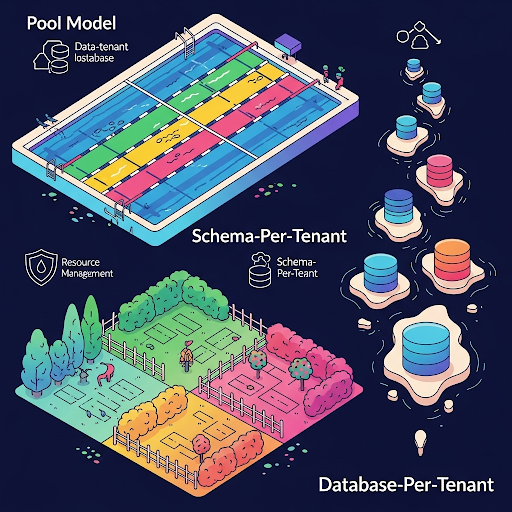
Below we explore each pattern with examples, pros & cons, and an illustrative diagram.
1. Pool Model (Shared Schema)
All tenants’ data lives in the same tables; each row includes a tenant_id (or similar) column that segregates tenant data. This is the simplest, most cost-efficient model, since there is only one database and schema to manage. However, it provides the weakest isolation: every tenant’s rows co-exist side-by-side, so queries must always filter by tenant, and a faulty query or missing filter can expose cross-tenant data. In this model, enforcing isolation relies on every query including the correct WHERE tenant_id = X clause (or using database Row-Level Security/RLS). Noisy neighbors are a risk: one tenant’s heavy workload can consume the shared resources and slow down all others.
					CREATE TABLE orders (
  id           BIGSERIAL PRIMARY KEY,
  tenant_id    UUID      NOT NULL, -- The all-important tag!
  order_date   TIMESTAMP NOT NULL,
  total_amount NUMERIC   NOT NULL
);

-- Fetch orders for Tenant A
SELECT *
FROM orders
WHERE tenant_id = 'a1b2c3d4-...';
Pros | Cons |
One schema to maintain | Weak isolation—requires tenant filters on every query |
Low operational overhead | Risk of accidental cross-tenant access |
Efficient resource usage | “Noisy neighbor” performance issues |
2. Schema‑Per‑Tenant
All tenants still use one database server, but each tenant gets its own database schema (namespace). For example, in PostgreSQL or SQL Server you might do:
					CREATE SCHEMA tenant_a;

CREATE TABLE tenant_a.orders (
  id           SERIAL PRIMARY KEY,
  order_date   TIMESTAMP,
  total_amount NUMERIC
);

-- For Tenant B
CREATE SCHEMA tenant_b;

CREATE TABLE tenant_b.orders (
  id           SERIAL PRIMARY KEY,
  order_date   TIMESTAMP,
  total_amount NUMERIC
);

-- Querying within a schema
SET search_path TO tenant_a;
SELECT * FROM orders;
This keeps each tenant’s tables logically separate, reducing risk of accidental cross-tenant queries. It also allows per-tenant customization of the schema. However, you still have a single database to back up and scale, so resource contention remains. Moreover, schema migrations and maintenance become more complex: every change must be applied to each tenant’s schema. Also, many databases limit the number of schemas or objects, so a very large tenant count could hit those limits.
Pros | Cons |
Logical isolation via separate namespaces | Schema migrations must run across all schemas |
Per-tenant customization of tables/indexes | Object limits(max schemas/tables) can be reached |
Easier per-tenant backup/restore | Shared resource contention remains |
3. Database‑Per‑Tenant
Each tenant has its own dedicated database instance. The application normally uses a mapping (catalog) from tenant ID to the tenant’s database connection string. For example:
					- - Provision two databases at the server level

CREATE DATABASE tenant_a_db;

CREATE DATABASE tenant_b_db;
In this model, tenants are fully isolated: one tenant’s data and workload never mix with another’s. You can scale or tune each tenant database independently. This offers the highest security and compliance (each database can even reside in a different region or use a different encryption key). It also avoids noisy neighbors entirely. The downsides are cost and complexity: you must provision (and possibly pay for) resources per tenant, and operations (backups, updates, patches) must be managed across many databases.
Pros
- Strongest isolation (physical separation)
- Per‑tenant performance tuning
- Compliance: separate regions, encryption keys
Cons
- High operational overhead—many databases to provision and manage
- Potential underutilization for small tenants
- More complex backup/restore automation
So, Which Model Should You Choose?
There’s no “one-size-fits-all” in multi-tenancy. Your best option depends on your use case, growth trajectory, compliance requirements, and engineering bandwidth.
Here’s a side-by-side comparison to help you decide their trade-offs.
Dimension | Pool Model (Shared Schema) | Schema‑Per‑Tenant | Database‑Per‑Tenant |
Data Isolation | Low (row‑level filters) | Medium (schema boundary) | High (DB boundary) |
Security | Medium (relies on filters) | High (namespaces) | Highest (physical isolation) |
Operational Overhead | Low | Medium | High |
Schema Evolution | Very easy (one schema) | Moderate (per‑schema migration) | Complex (per‑DB migration) |
Backup & Restore | Challenging per tenant | Straightforward per schema | Straightforward per database |
Resource Efficiency | Excellent (shared caches/I‑O) | Good (shared instance resources) | Variable (per‑DB resources) |
Noisy Neighbor Risk | High | Medium | Low |
Cost Efficiency | Highest | Moderate | Lowest (for many small tenants) |
Customizability | Low | High (schema tweaks) | High (full control) |
Compliance / Residency | Hard | Easier | Easiest |
Designing a multi-tenant architecture isn’t just a technical decision—it’s a strategic one. Your choice will influence everything from how fast you can onboard new customers, to how easily you scale, how safely you handle sensitive data, and how much you spend month over month.
Each of the three database patterns comes with its own strengths and compromises. Ultimately, the right choice depends on your business. When in doubt, start simple.
- Start with the Pool Model for early‑stage apps or small tenant counts due to its simplicity and low cost.
- Migrate to Schema‑Per‑Tenant if you need added isolation or per‑tenant customizations once you outgrow the pool model.
- Adopt Database‑Per‑Tenant for strict security/compliance requirements or very large/high‑value tenants needing dedicated resources.
In Part 2 of this series, we’ll dive into tools and infrastructure patterns that support scaling and operating large-scale multi-tenant systems—across both cloud and on-premise environments.